Collect the right information at checkout — every time
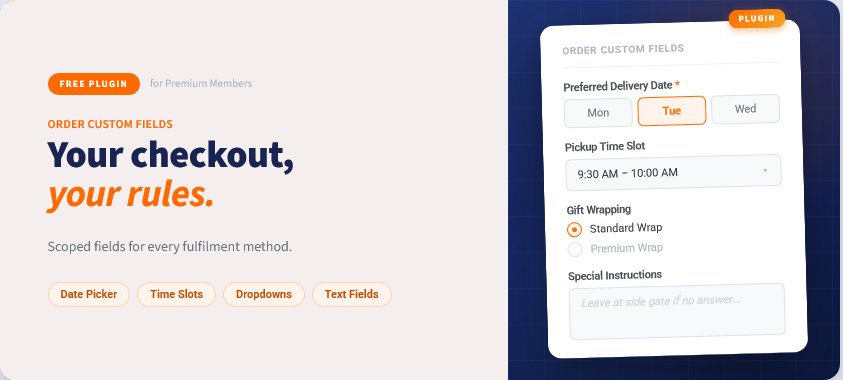
Every order tells a story. Make sure yours has all the details. Order Custom Fields lets you add personalised input fields to your checkout, so customers can tell you exactly what they need — from delivery dates and pickup times to gift messages and special instructions.
No developer required. No workarounds. Just the right information, captured at the right moment.
Why store owners love it
Missed delivery windows. Wrong pickup times. Gift orders that arrive without a message. These aren't just inconveniences — they're the kind of friction that costs you repeat customers. Order Custom Fields closes that gap between what customers want to communicate and what your checkout actually captures.
What you can do with it
Capture any information your fulfilment needs
Add text fields, dropdowns, radio buttons, date pickers, time selectors, and full delivery schedulers to your checkout. Each field can be scoped to the fulfilment methods that make sense — shipping, store pickup, delivery, or shipping quote — so customers only see what's relevant to them.
Take control of delivery scheduling
Let customers choose a delivery or pickup date from a calendar you control. Set how far in advance orders must be placed, define a booking window, block out public holidays, and restrict which days of the week are available. Cut-off times ensure late orders roll to the next eligible date automatically.
Offer appointment-style pickup slots
Running a café, florist, or click-and-collect store? Configure time fields with fixed appointment slots so customers book a specific window — not just a vague time of day. Set your opening hours, choose your slot duration, and the system handles the rest.
Make fields required or optional — your call
Mark a field as required to ensure nothing gets missed before checkout completes. Leave it optional for fields that are helpful but not essential. Add placeholder text, default values, and hover tooltips to guide customers without cluttering the form.
Style it to match your store
Assign custom CSS classes to any field for pixel-perfect styling that fits your brand. Control the display order of fields with a simple order number — no drag-and-drop frustration.
Field types included
Type | Best for |
|---|
Text | Short single-line responses (e.g. engraving text, promo codes) |
Text Area | Longer notes and special instructions |
Display Text | Read-only messages or terms shown at checkout |
Radio / Dropdown | Single-choice options (e.g. gift wrapping style) |
Checkbox / Multi-select | Multiple-choice selections (e.g. add-ons, preferences) |
Date | Delivery or event date selection with full scheduling controls |
Time | Pickup or appointment time with configurable slots |
Delivery | Full weekly delivery scheduler with time windows and capacity caps |
Built for the way you actually operate
Fulfilment-aware — fields only appear for the checkout methods you assign them to
Holiday blocking — set recurring or one-off blackout dates so customers can never book unavailable days
Capacity controls — cap the number of delivery bookings per day to match your team's capacity
Pre-order ready — works alongside the Pre-Order plugin to capture custom data for pre-order purchases
Non-destructive toggling — disable a field without deleting it; re-enable it any time without losing configuration
Searchable & filterable admin — manage dozens of fields easily with live search and type filters
Who it's for
Order Custom Fields is built for merchants who need more from their checkout than a name and an address.
Food & beverage — bakeries, caterers, meal kit services capturing delivery dates, dietary notes, and pickup slots.
Floristry & gifting — gift message fields, preferred delivery windows, and recipient details.
Click & collect retail — time slot booking so customers arrive when you're ready for them.
Events & experiences — custom questions that capture exactly what each customer needs before their booking.
Any store where "standard checkout" isn't quite enough.
Simple to set up. Easy to manage.
Install the plugin, click Manage, and create your first field in under two minutes. Fields go live immediately on your checkout — no theme edits, no code changes. Disable, re-order, or update fields any time from the admin panel without taking your store offline.
Install Order Custom Fields and start checkout conversations that actually help you fulfil better.
























 Hungary
  Australia
  United States
  New Zealand
  Canada
  Ireland
  United Kingdom
  China
China  Germany
  Netherlands
  Belgium
  Portuguese
  French
  Cyprus
  Denmark
  Egypt
Egypt  Finland
  Greece
  Indonesian


